Local project library
Project records live in an SQLite database on your computer. Add folders and rescan when your archive changes.
Triple.U
From Triple.U Lab · Version 1.1.0
A free project manager for macOS and Windows.
Keep music projects from different DAWs in one local library. Search, organize, open projects, and analyze matched audio exports for BPM and key.
Download options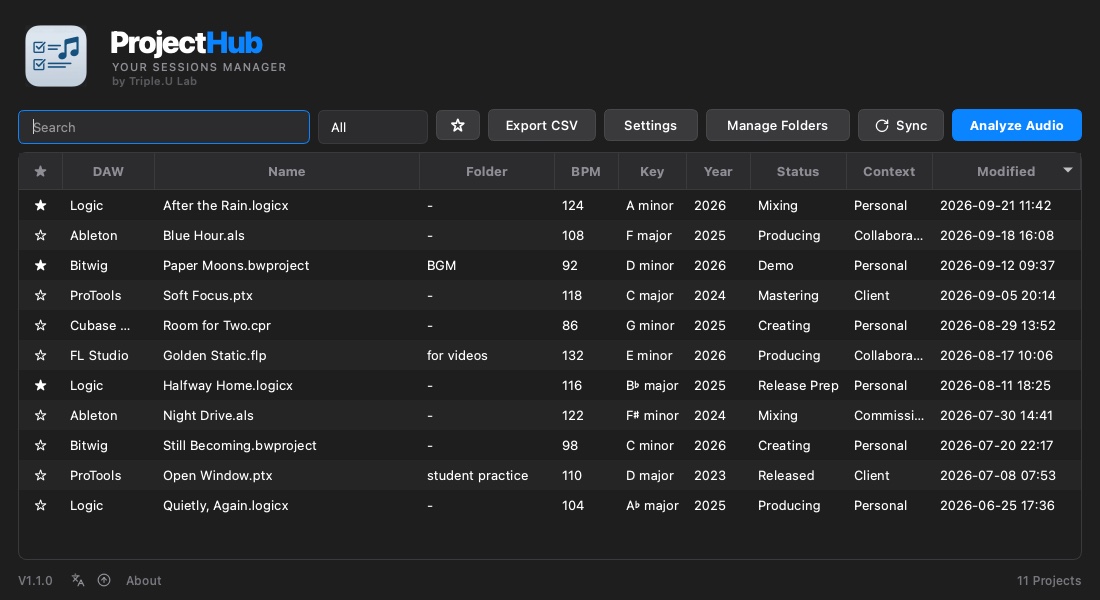
Workflow
Add the folders where your DAW projects live.
Filter by DAW, folder, favorite, year, Status, or Context.
Get BPM and key from exports that can be matched to a project.
Return to a session from the library when you need it.
DAW support
Project recognition follows the file types and folder rules used by ProjectHub.
Tested
.logicx.als.bwproject.ptxBeta
.cpr.flpCore project management is available for Beta formats. Folder-layout validation is still expanding, so they are not at the same support level as the Tested formats.
Included
Project records live in an SQLite database on your computer. Add folders and rescan when your archive changes.
Find projects by name, DAW, folder, year, favorite, Status, or Context.
Use built-in labels or manage your own. Custom labels and the quick selector choice are saved with the active database.
Analyze matched exported audio, correct BPM manually, and review or restore earlier analysis results.
Keep projects grouped, add notes, mark favorites, and open a project or locate it in your file manager.
Export project metadata to CSV and see total projects and DAW counts from the active library.
Put DAW, Status, or Context beside Search. The DAW selector lists only DAWs found in the current database.
Check for compatible releases from the app. ProjectHub does not silently download or replace itself.
Free product · Version 1.1.0
Choose the build for your computer.
macOS
arm64 · M1 or later · DMG
A separate build for Apple Silicon Macs.
Download DMGmacOS
x86_64 · DMG
A separate build for Intel Macs. This is not a universal binary.
Download DMGWindows
x86_64 · ZIP
A ZIP package for 64-bit Windows. It is not an installer.
Download ZIP archiveRequirements and data
macOS 15 or later. Separate arm64 and x86_64 builds are provided; choose the one that matches your Mac.
Windows 10 or later, x64. The v1.1 package is a ZIP archive.
Project records and app preferences are stored in a local SQLite database. You choose which folders ProjectHub scans. Custom labels and the quick selector preference travel with the active database.
FAQ
Yes. ProjectHub v1.1 is one complete free application for macOS and Windows.
Cubase and FL Studio projects can use the core project-management features. Folder-layout validation is still expanding. Audio matching for Beta projects is conservative: ambiguous matches are left unanalyzed.
No. ProjectHub searches the project folder and DAW-specific export locations for supported audio files with the project name in the filename. When several candidates match, it ranks filename dates newest first, then project-name match and export markers (Master > Mix > MMO > MMM > unmarked > Demo); the file's modified time breaks remaining ties. An unnamed export is considered only when it can be matched unambiguously to a single project. We recommend exporting at least one clip with the project name in its filename. Hover over the BPM or Key value to see which file was analyzed.
Use Check for Updates in ProjectHub. The app checks for compatible release information and opens the provided HTTPS download page; it does not silently download or replace the app.